Learn your patterns. Adjust your plan. Find your bedtime rhythm.
A Plan will help set you up for success in getting a great night's sleep! It's customizable and will help you carve out time for unwinding, rest, and gentle wake up!
Your plan includes three parts:
- Bedtime: You can set a bedtime, include a turndown service, and create a bedtime reminder.
- Bedtime Playlist: This is a list of sound/light combinations that you would like to play during your nightly routine.
- Rise Time (alarm): Give yourself a gentle wake up with our Rise Time options. For more information on Rise Times, check out our Hatch Sleep Clock, Rise Time/Alarm Guide.
Here's all you need to know about how to get started with your bedtime plan!
Setting up your routine:
Your bedtime playlist is your nightly wind-down — a sequence of steps that takes you from the end of your day to actually being asleep. Not a formula. Something you build for yourself, and keep making better.
Think of it in three phases.
Phase 1 — Wind down your mind
Most nights, the biggest obstacle to sleep is what's still running in your head. A 30–60 minute wind-down gives it somewhere to go — and makes the difference between lying awake and actually drifting off.
What this might look like
- A podcast or audiobook episode with warm amber light
- A sound bath or immersive ambient soundscape
- A guided meditation or breathing exercise
- Campfire sounds with a soft reading light
Different nights call for different things. Start with what sounds good tonight.
Phase 2 — Drift Off
Sleep isn't something you do — it's something that happens once you stop getting in your own way. This phase is about giving your mind something quiet to land on as your eyes close.
A sunset fade works well here: your sleep sound at the volume you'll use overnight, paired with a warm light that gradually dims to darkness. As the room shifts, your body gets the signal.
Phase 3 — Stay Asleep
No light. A sound that carries you through the night — pink noise, rain, ocean waves. Around 30% volume, playing all night, is enough to mask the small disruptions that might otherwise pull you out of sleep.
How to set up the Bedtime Plan:
Once you are connected to your Hatch Sleep Clock, you will want to begin to build your routine.
Since this is the first time you have set up your Hatch Sleep Clock, prompts in the app will guide you all along the way!
As your Hatch Sleep Clock is connecting, you will be asked a series of questions that will help understand when you want to get to bed, what you would like to listen to as you drift off to sleep, and what time you want to get up.
After you have gone through the questions, you will be prompted to finish setting up your Hatch Sleep Clock. The app will guide you in the correct position, height, and placement of the device. After you answer a few additional questions about your sleep situation, your Hatch Sleep Clock and bedtime plan will be ready to use!
Using Your Plan
Using your plan from your Hatch Sleep Clock
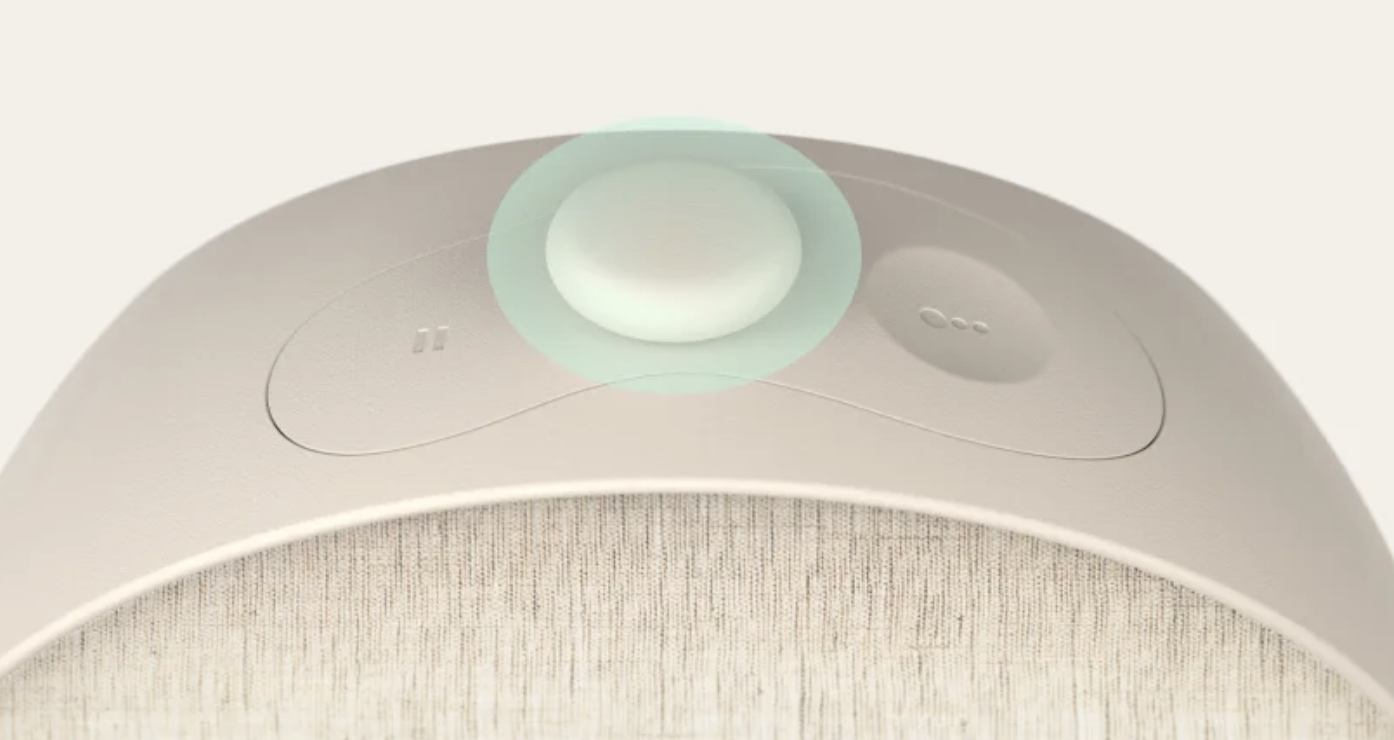
Start
You can start your Bedtime Plan by pressing the big button on the top of your Hatch Sleep Clock.
Stop
In order to stop your plan, you want to press and hold the big button until your Hatch Sleep Clock shuts off.
Skip a step
You can skip a step in your routine by pressing the big button.This will skip the current step and transition to the next step in your routine. If you do not wish to skip a step, your routine will play each consecutive step automatically as it has been set up to do.
Using your plan from the Hatch Sleep App
Start your playlist
To start your plan, just navigate to the "plan" page in the Hatch Sleep app and tap on the "start" button next to your Bedtime playlist.
Stop or pause your routine
You can stop the routine or content that's currently playing by tapping the power symbol on the right side of the mini-player at the bottom of the screen. If you just need to pause the routine, tap on the mini player at the bottom of the page, it will expand. Tap on the pause button to pause the content.
Pause Pro tips!
- While you can pause the sound, the light will remain on when the sound is paused
- After one hour, the pause will "time out" and your Hatch Sleep Clock will shut off
- If you change the light or sound while your device is paused, it will automatically resume playing with the new setting.
Editing Your Playlist
Need a change in your plan? It's easy to make adjustments!
Add a step to your playlist:
Pro tip! Each audio option is paired with a light setting. After you tap "Add to playlist", if you find that you would like to edit the light option, you can do so by following the steps to edit your playlist:
- Connect to your Hatch Sleep Clock and tap on the "Plan" icon.
- Tap on the plan step that you would like to make light setting changes to.
- Once you are ready to save the changes to your plan, tap on the "Save" button.
Using the sleep button instead of your playlist:
The Sleep Button- new on Hatch Sleep clock is a customizable button you can use to play content from your Hatch Sleep Clock without using your playlist!
How to customize your Sleep Button:
Still need help? Click on the chat bubble on this page to send us a message!